Create P2P Payment
Create a deposit on the P2P rail — the depositor pays a matched withdrawer directly. Same endpoint and body as Create Slip
Same call as Create Slip
Create P2P and Create Slip both use POST /v1/p2p/public/session/create with the same body and response. This page adds how the P2P rail matches deposits with withdrawals
How the P2P rail works
The short tour: what is different from a normal deposit, what falls back to the bank, and which webhook closes the order
How to use in 4 steps
Create the payment, send the customer the link, and process the final webhook. The platform handles matching and payment instructions.
Create the payment
YouSame request as Create Slip: send the amount (a whole multiple of 100) and the account the customer will transfer from, plus X-Idempotency-Key — a new UUID per request; it only blocks a double submit within 5 seconds
{
  "role": "DEPOSITOR",
  "amount": 200,
  "ttl_seconds": 1200,                // link lives 20 minutes
  "profile": { "depositor": {
    "sender_bank": "SCB",          // account the customer pays from
    "sender_account": "1234567890"
  }},
  "order_id": "ODRW-322863625",
  "order_user_reference": "USER134",
  "return_url": "https://merchant.example.com/deposit/done"
}"redirect_url": "https://demo.sky777881.xyz/pay/slip/yUFSwamgJN…"
Send the customer the link
YouRedirect them to the returned URL, or send the link over any channel — the rest happens there.
Wait while the customer pays
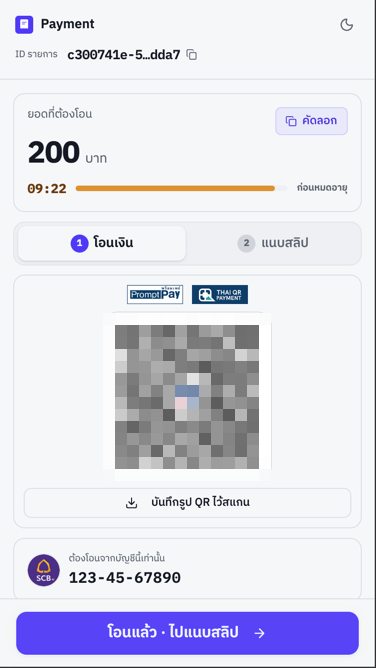
Customeron our pageThe platform matches the deposit with a withdrawal first; the customer then sees the destination account and QR, and has a set window to transfer.
If no withdrawal is available, the platform can switch to a direct bank deposit within the same request. The customer pays the displayed account; a successful deposit still sends PAYMENT_PAID.
Credit the customer once per payment, only after PAYMENT_PAID — not when the create call succeeds or the page returns to return_url
PAYMENT_PAIDDeposit successful — credit the order identified by data.payment.order_id with data.payment.payment_amount (not payment.amount), for both P2P and direct bank deposits
PAYMENT_FAILEDThe slip was already used (DUPLICATE_SIGNATURE)
PAYMENT_CANCELEDCancelled for real — the payer cancelled or an admin released the match; identify the order by data.payment.id. An expired deposit sends no webhook (since 13 Oct 2026)
Matching, waiting for payment, slip checking, expiry, and opening a dispute send no webhook. Check the status by polling GET /v1/payment/info or GET /v1/p2p/public/flow/:flowId instead of assuming silence means completion.
https://testnet.trustsig.xyz/v1/p2p/public/session/createAuthentication Status
API Key is required for all requests Webhook Secret
Headers
x-api-keyYour shop API key
x-signatureHMAC-SHA256 of timestamp|method|fullUrl|body signed with your secret key, sent as 64 hex characters
How to create the signaturex-timestampCurrent Unix time in milliseconds — must be the same value used to create x-signature
X-Idempotency-KeyUUID ใหม่ทุก request ระบบใช้กันการส่งซ้ำภายใน 5 วินาที request ที่ซ้ำในช่วงนั้นจะได้ 409 (code 29000) และไม่ได้ response เดิมกลับมา ถ้าไม่ส่ง header นี้จะได้ 400 (code 1001)
Parameters (Request Body)
roleบทบาทของ session ถ้าไม่ส่งจะเป็น GENERIC ซึ่งได้สิทธิ์ถอนเงินด้วย สำหรับหน้านี้ให้ส่ง DEPOSITOR ทุกครั้ง
ttl_secondsอายุของ session เป็นวินาที (เช่น 1200 = 20 นาที) ถ้าไม่ส่งจะใช้ 1800 (30 นาที) ส่งได้สูงสุด 3600 ควรตั้งให้เกิน 600 เพราะถ้า session เหลือเวลาไม่ถึง 10 นาที ลูกค้าจะเริ่มรายการฝากไม่ได้ (38072)
profile.depositor.sender_bankรหัสธนาคารของผู้ฝาก เช่น SCB, KBANK, BBL ตัวพิมพ์เล็กหรือใหญ่ก็ได้ หรือส่งเลขธนาคาร 3 หลักแทน เช่น 014 ถ้าลูกค้าจ่ายผ่านเป๋าตังให้ส่ง G_WALLET ดูรหัสทั้งหมดได้จาก GET /v1/ebank/bankConfig?purpose=payer — role DEPOSITOR ต้องส่ง profile.depositor ทุกครั้ง
profile.depositor.sender_accountเลขบัญชีธนาคารของผู้ฝาก ยาว 5–30 ตัวอักษร ถ้า sender_bank เป็น G_WALLET ให้ใส่เลขบัญชีธนาคาร 10 หลักที่ลูกค้าใช้เติมเงินเข้าเป๋าตัง ไม่ใช่เลขกระเป๋า
amountจำนวนเงินที่ต้องการชำระ (หน่วยเป็นบาท) ต้องเป็นจำนวนเต็มร้อย เช่น 400 หรือ 1100 ระบบตรวจยอดตั้งแต่ตอนสร้าง session ยอดอย่าง 487 จะได้ 38002 และไม่ได้ session ถ้าร้านยังใช้ยอดแบบตัวเลือก ยอดต้องตรงกับตัวเลือกใน Option List
order_idYour order reference, up to 200 characters. Optional, but recommended: it is attached to the deposit the customer creates from this session. While a session with the same order_id is still alive, a new one is refused with 38045. You may send it as profile.depositor.order_id instead; if both are sent, the profile value wins.
order_user_referenceYour ID for the customer (for example the user ID in your system), not their name. Up to 200 characters, optional. A customer with this reference, or with the same sender account, who still has a transfer in progress cannot open a new session (409, 38078). You may send it as profile.depositor.order_user_reference instead; if both are sent, the profile value wins.
return_urlURL ที่จะ redirect กลับเมื่อทำรายการเสร็จสิ้น ต้องเป็น URL เต็มที่ขึ้นต้นด้วย https:// หรือ http:// ยาวไม่เกิน 2000 ตัวอักษร
flow_idใช้เปิด session ใหม่ให้รายการที่มีอยู่แล้ว เช่น เมื่อได้ 409 รหัส 38078 (ลูกค้ายังมีรายการโอนค้าง) ให้ส่ง flow_id ที่อยู่ใน data ของ error นั้น รูปแบบ p2p:<id>, classic:<id> หรือ classic-deposit:<id> ปกติไม่ต้องส่ง
display.colorสีของหน้าชำระเงิน ส่งเป็น "สีหลัก" หรือ "สีหลัก,สีพื้น" เช่น "blue,zinc" — สีหลัก: red, orange, amber, yellow, lime, green, emerald, teal, cyan, sky, blue, indigo, violet, purple, fuchsia, pink, rose · สีพื้น: gray, zinc, neutral
display.themeโหมดสีของหน้าชำระเงิน
display.nameชื่อร้านที่แสดงบนหน้าชำระเงิน ไม่เกิน 100 ตัวอักษร — ทั้ง display ใช้ปรับหน้าตาอย่างเดียว ไม่มีผลกับยอดหรือบัญชีปลายทาง ถ้าค่าไม่ถูกต้องจะได้ 422
Track the deposit
The customer creates the deposit on the hosted page, so the create call does not return a flow_id yet. Keep data.session_token from the response and use the two calls below.
1. Find the flow_id — POST /v1/p2p/session/lookup
Same headers as the create call. Works only while the session is alive (ttl_seconds, default 1800, max 3600) — after that it returns 404 38054, so save data.flow.flow_id as soon as it appears. data.flow is null until the customer has created the deposit.
POST /v1/p2p/session/lookup
Content-Type: application/json

{
  "session_token": "yUFSwamgJNkxcvWC_UY-okEzM3C9jOjSaqhMxWpEaAk"
}{
"data": {
"sid": "ccb0978b-be76-49bb-a670-196705cbd0b5",
"role": "DEPOSITOR",
"session_status": "active",
"expires_at": "2026-04-10T04:02:57.609Z",
"amount": 200,
"flow": {
"flow_id": "p2p:6f1c2a9e-3b7d-4e21-9c55-0a8d4b1e7f30",
"processing_channel": "P2P",
"status": "PROCESSING",
"data": { "id": "6f1c2a9e-3b7d-4e21-9c55-0a8d4b1e7f30", "match_status": "MATCHED" }
}
},
"success": true,
"code": 0
}2. Poll the status — GET /v1/p2p/flow/:flowId
Reads from the database and never expires. Read data.processing_channel and data.status.
GET /v1/p2p/flow/p2p:6f1c2a9e-3b7d-4e21-9c55-0a8d4b1e7f30| processing_channel | flow_id | Meaning |
|---|---|---|
P2P | p2p:<match_id> | Matched with a withdrawal; the customer pays the withdrawer directly |
CLASSIC_FALLBACK | classic-deposit:<payment_id> | No match; the customer pays the shop account shown on the page |
P2P_QUEUE | queue:<queue_id> | Waiting in the queue. Once matched, the response carries a new flow_id — switch to polling that one |
| status | Meaning |
|---|---|
PENDING_MATCH | Waiting for a match — no action from the customer yet |
PENDING_USER_ACTION | Waiting for the customer to transfer and attach the slip |
PROCESSING | In progress — matched, waiting for the transfer, or checking the slip |
COMPLETED | Deposit completed |
FAILED | Ended without payment — expired, cancelled, or lost a dispute |
PAYMENT_PAID webhook, with data.payment.payment_amount (what was credited, may differ from payment.amount when an admin settled at the amount actually transferred — see data.amount_adjustment). An expired session sends no webhook.Test on testnet
Close a deposit without a real transfer or slip. The platform completes it with a test slip and sends the same webhooks as production.
POST /v1/p2p/acceptForTesting/6f1c2a9e-3b7d-4e21-9c55-0a8d4b1e7f30
Content-Type: application/json
X-Idempotency-Key: 0b5e1f7a-2c4d-4a8e-9f61-3d7c2e5b8a14

{}:idis the part offlow_idafter the prefix — the match id ofp2p:<id>or the payment id ofclassic-deposit:<id>. The same call works for both.- A deposit still in the queue (
queue:<id>) cannot be closed yet — wait until it is matched. - The body may be
{}.sender_name,sender_bankandsender_accountare optional overrides for the test slip. - Expect
PAYMENT_PAIDat your webhook URL. On mainnet the call is refused with1007.
P2P errors
In addition to the common errors on the right. Body shape: see Error Codes in the Reference section.
| HTTP | code | Returned by | Meaning |
|---|---|---|---|
| 409 | 38045 | session/create | This order_id already has an active session — use a new order_id |
| 400 | 38002 | session/create | Amount not accepted — not a whole multiple of 100 (e.g. 487), out of range, or amount_option sent while the shop is in free-amount mode |
| 422 | — | session/create | A field failed validation, e.g. "display: ..." for a wrong color, theme or name |
| 404 | 38054 | session/lookup | Session expired or not found — use GET /v1/p2p/flow/:flowId with the flow_id you saved |